Why AI Coding Agents Waste Half Their Context Window
Your AI coding agent is dumber than it needs to be. Not because of the model. Because of your codebase.
Every time you hand an agent a task, it starts from zero. It doesn’t know where your routes are defined. It doesn’t know your naming conventions. It doesn’t know that you moved the auth middleware last week. So it does what any rational actor does with no information: it searches.
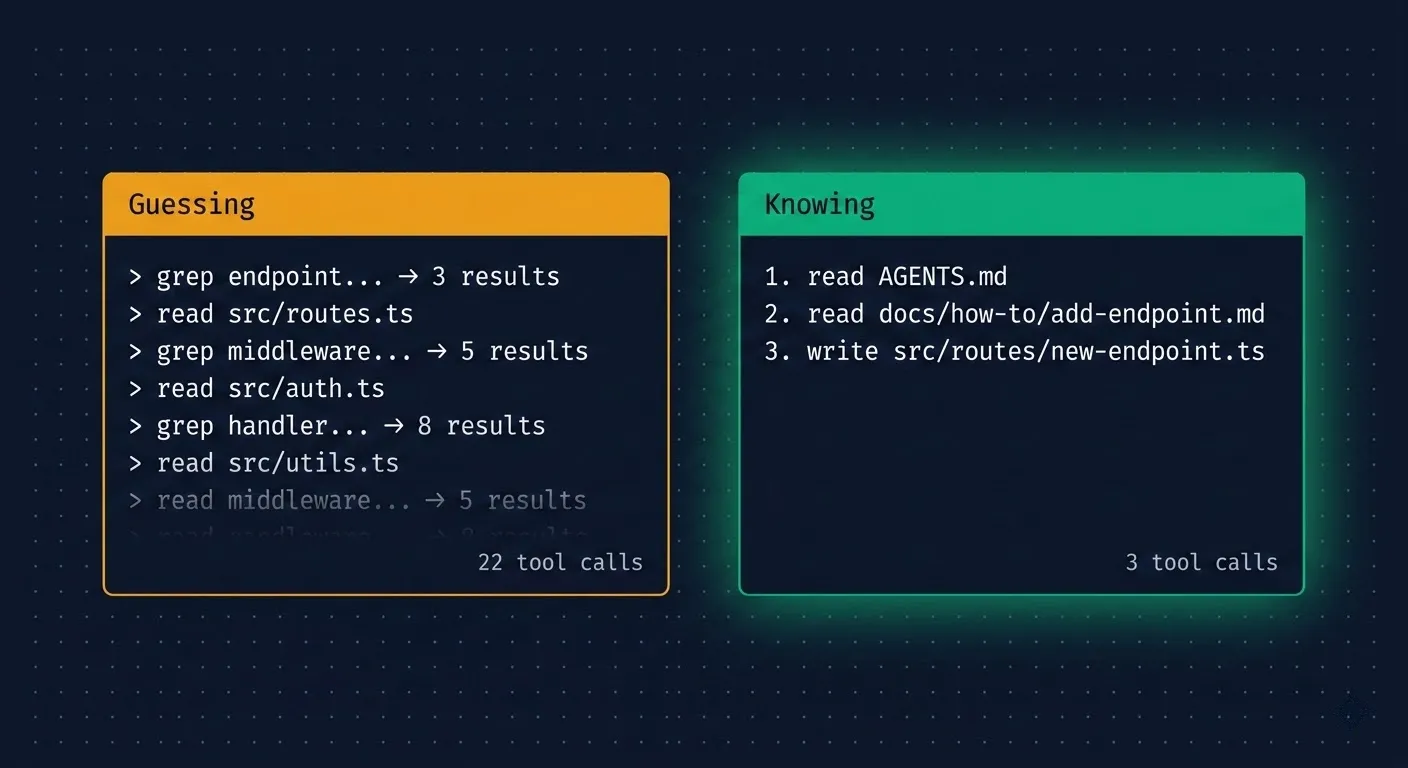
Grep for “endpoint.” Read 4 files. Grep for “route.” Read 3 more. Glob for handlers. Read the middleware. Check the types. Twenty tool calls later, it finally understands enough to start writing code.
This is hill-climbing, and the cost goes beyond just wasted tokens.
What is hill-climbing?
In optimization theory, hill-climbing is simple: you start at the bottom, look around, take the step that moves you highest, and repeat. You can’t see the summit. You just keep stepping upward until you get there.
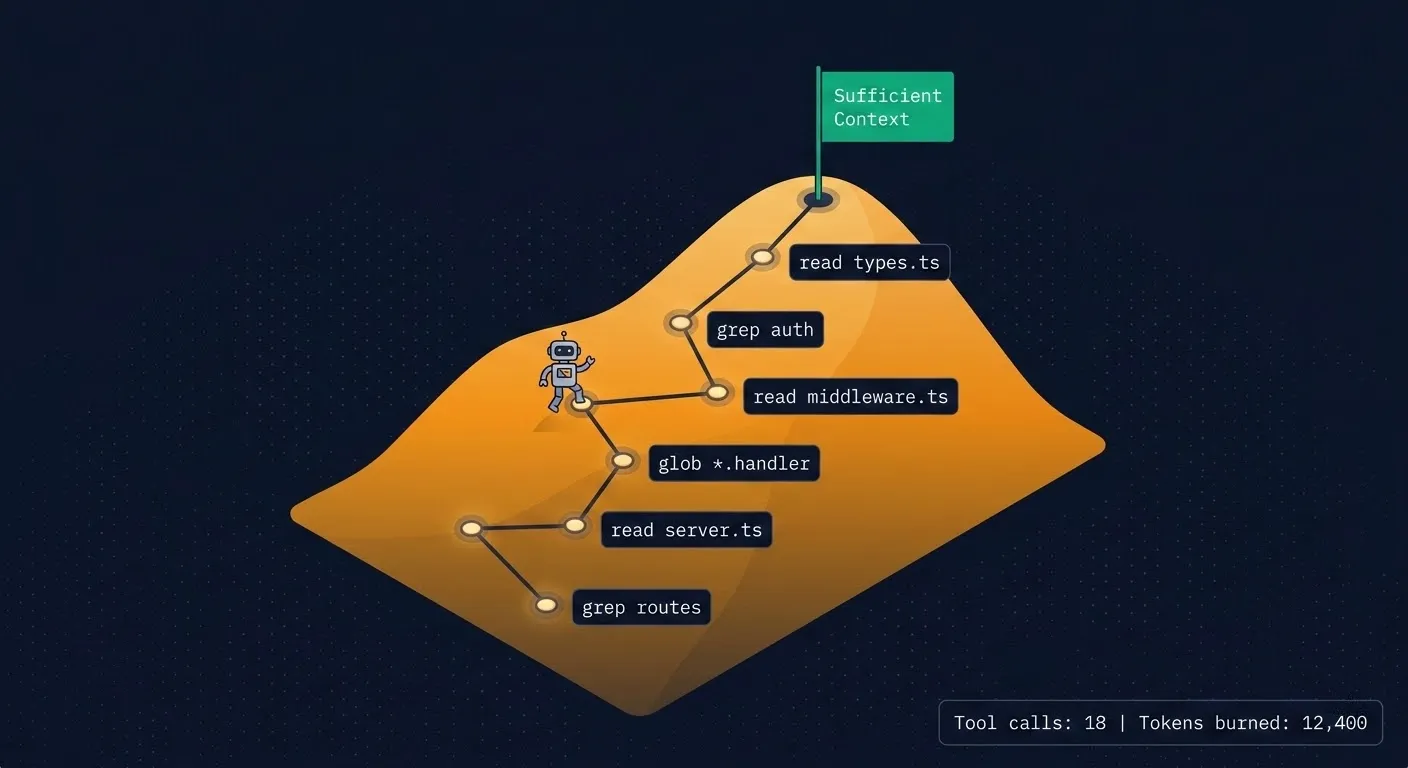
AI coding agents do exactly this. The “hill” is understanding: sufficient context to act on a task. Each tool call is a step — a grep, a file read, a glob search. The agent can’t see the full codebase, so it takes one step, evaluates what it learned, decides the next step, and keeps going until it has enough context to write code.
Every step costs tokens and time.
What this looks like in practice
Give an agent a straightforward task: “add a new API endpoint.” On an undocumented codebase, watch what actually happens:
- Grep for “endpoint” or “router,” gets 3-8 results across different files
- Read the most promising file, partially understands the pattern
- Grep for route registration, finds the middleware chain
- Read the middleware, discovers the auth pattern
- Grep for request validation, finds another set of files
- Read the type definitions, finally understands the full pattern
- Start writing code
That’s 15-20 tool calls and thousands of tokens consumed before a single line of new code exists. The actual change might be 50 lines. The search cost was 10x that in context.
The cost is worse than wasted tokens
Context position affects intelligence. This is measurable.
Research on LLM attention patterns (including “Lost in the Middle” by Liu et al.) shows that models reason most effectively at the beginning of their context window. As context fills up, attention degrades. Information presented early gets more cognitive weight than information buried deep in a long context.
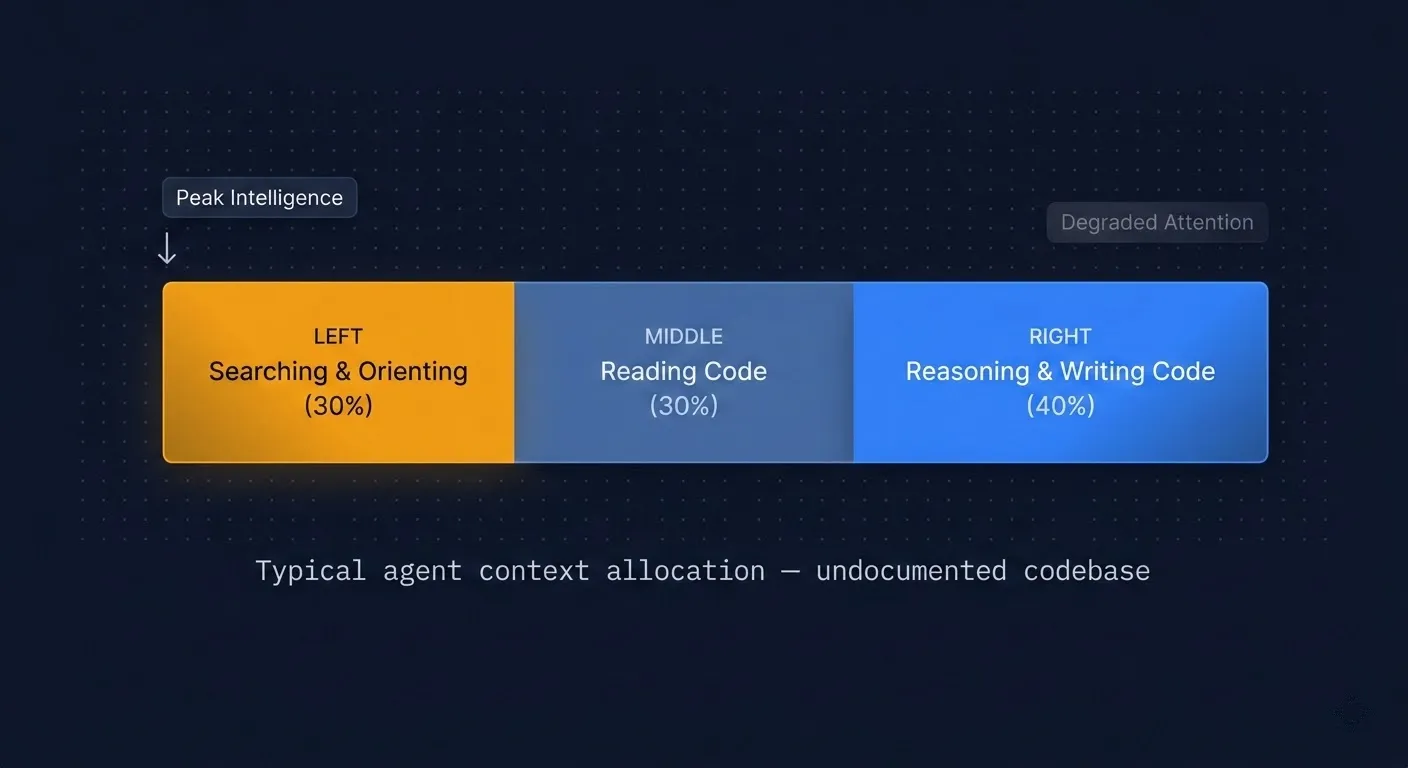
Think about what this means for hill-climbing. All that searching happens first. The agent burns its sharpest reasoning on grep results and file reads, then gets to the actual task with degraded attention. By the time it starts writing code, it’s working with a noisier, less focused version of itself.
I’ve watched the same model, given the same task, produce noticeably better code when it oriented in 3 tool calls versus 20. It’s not just faster. The agent that spent less context on search had more capacity left for reasoning about edge cases and existing patterns.
On an undocumented codebase, agents burn 20-40% of their context window on orientation alone.
Flatten the hill
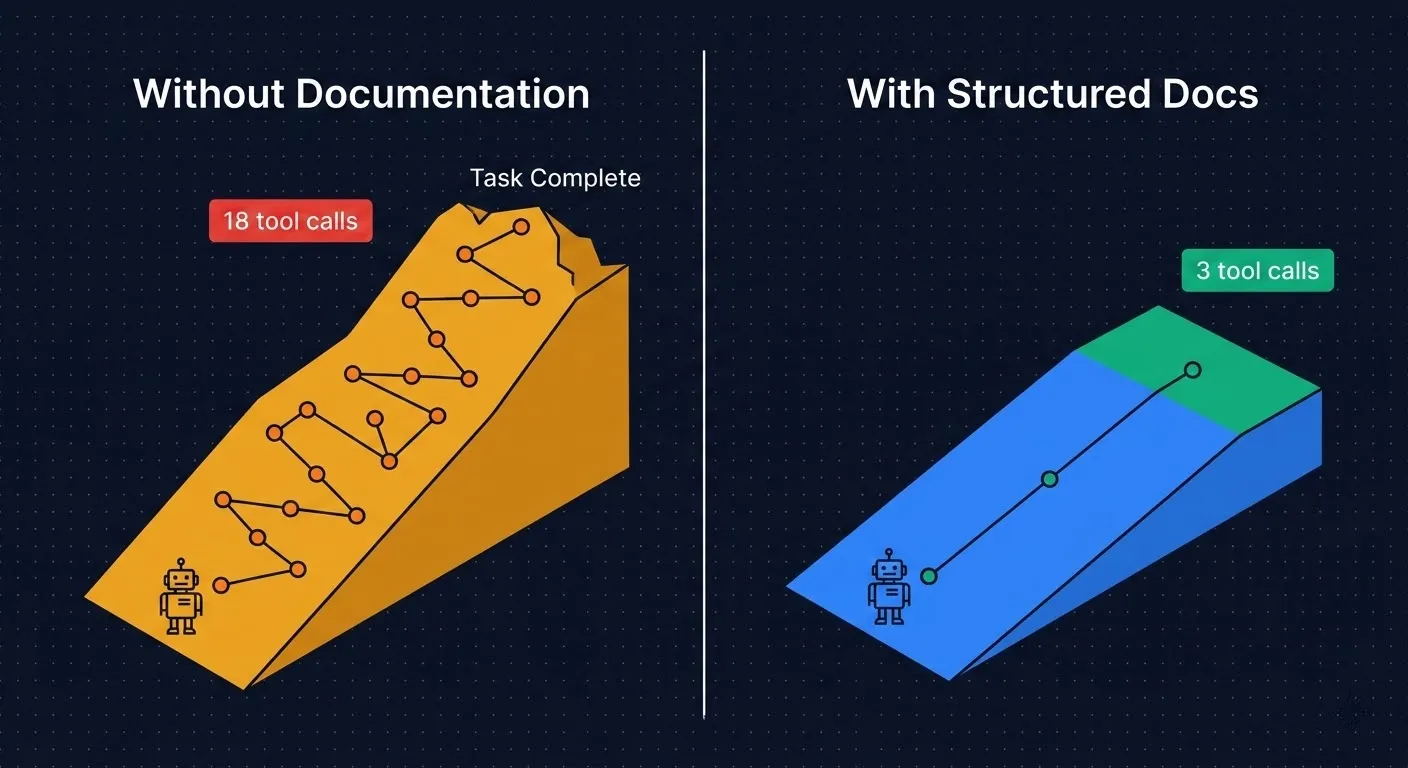
You don’t optimize this by helping the agent climb faster. You make the hill shorter.
People spend a lot of energy on system prompts and agent configurations, but your codebase structure has a much bigger effect on agent performance. Directory names, file organization, documentation: these are all inputs that shape how quickly an agent can orient and act.
The fix is hierarchical documentation designed for machine navigation. Think of it as an optimization function: how few tool calls can an agent make before it has enough context to start working?
The three-layer documentation system
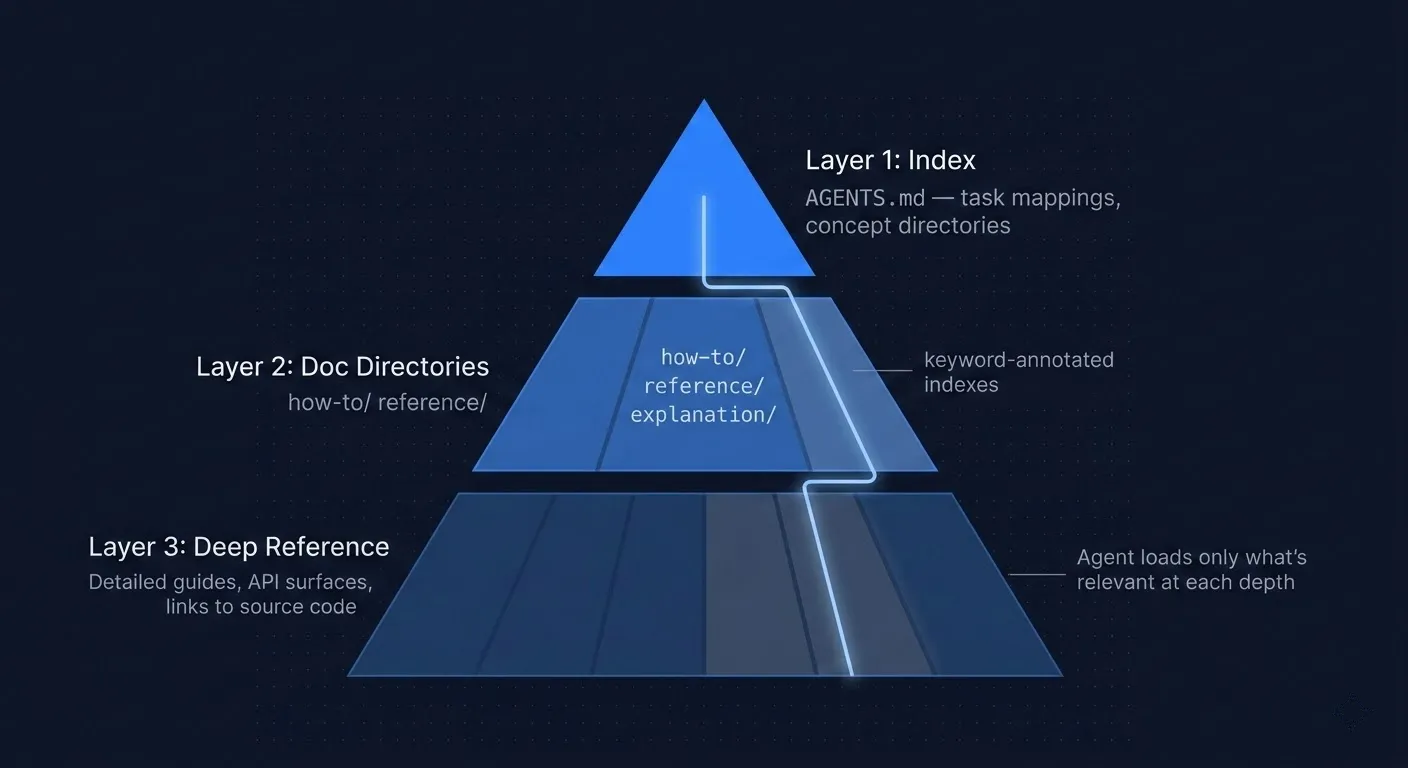
Layer 1: The Index. A single file (I use AGENTS.md) that the agent reads first. It maps tasks to files: “I want to add an API endpoint” points to docs/how-to/add-api-endpoint.md. It includes the repository structure, key architectural decisions, and top gotchas. Most importantly, it includes a directory of important documentation to start with for each concept. It takes one tool call to orient the agent instead of ten.
Layer 2: Searchable documentation directories. Organized by intent, not by code structure. I use the Diátaxis framework: how-to guides, reference docs, explanations, and tutorials. File names act as search keywords, so add-api-endpoint.md instead of guide-3.md. Directory index files list search keywords next to every link. An agent grepping for “middleware” or “auth” hits the directory index and immediately finds the right doc path without reading every file in the directory.
Layer 3: Right-sized depth. Each level of documentation contains only the information appropriate for that level of complexity. The index gives the map, no implementation details. How-to guides give the pattern with code examples, enough to execute, and they link to deeper reference docs for edge cases. Reference docs cover full API surfaces for agents that need to go further. Documentation links to relevant code whenever the source code would explain better than a minimal code example. Some would say the source code is Layer 4.
This matters because a simple task only needs two levels before the agent can start writing code. A complex task drills into three, never searching across files to find how specific functionality is implemented. The agent never has to ingest 10,000 tokens of reference documentation or source code when 500 tokens from a how-to guide would have been enough.
How I do this in Stoneforge
I build Stoneforge, an open-source AI orchestration platform where AI agents are first-class contributors. I’ve been iterating on this documentation architecture for months, and a few things have been particularly high-leverage.
Our AGENTS.md maps every common task to the exact file an agent needs. The docs directory uses the Diátaxis framework: 9 how-to guides, 4 reference docs, 4 architectural explanations, organized by what you’re trying to do rather than where the code lives. A gotchas.md file captures the top 10 pitfalls an agent would otherwise discover through expensive trial and error.
But the structure only works if it stays current. I enforce evergreen documentation through agent prompts and code review: every code change must update the relevant docs and hierarchy links. If docs go stale, hill-climbing costs creep back up. This is the maintenance tax you have to pay, and skipping it compounds fast on a growing codebase.
I also auto-index all documentation into SQLite and search it with FTS5 full-text search. This gives agents relevancy-ranked results instead of raw file matches. For large doc sets, it’s significantly faster and more context-efficient than grep or ripgrep. The agent finds the most relevant doc in a single ranked query instead of scanning through 30 grep hits and deciding which ones matter.
The result: agents orient in 1-3 tool calls instead of 15-20. Less than 10% of context spent on navigation instead of 20-40%.
Where to start
If you take one thing from this: add an AGENTS.md to your repo. Map your 10 most common tasks to the files an agent would need. That alone will cut orientation cost dramatically.
Then build out the hierarchy. Searchable doc directories with keyword-annotated indexes. Right-sized content at each level. Enforce updates through your review process so the docs don’t rot.
Your codebase is the biggest prompt your agent will ever receive. Make it a good one.
Frequently Asked Questions
What is hill-climbing in AI coding agents?
Hill-climbing is the process where an AI coding agent explores an unfamiliar codebase step by step — grepping, reading files, and globbing — to build enough context to act on a task. Each tool call is a “step” up the hill. On undocumented codebases, this typically takes 15-20 tool calls and consumes 20-40% of the agent’s context window before any code is written.
How does codebase documentation improve AI agent performance?
Structured documentation gives AI agents a direct path to the information they need instead of forcing blind exploration. A well-organized AGENTS.md index file, searchable doc directories, and right-sized reference docs can reduce agent orientation from 20+ tool calls to just 1-3, preserving more of the context window for actual reasoning and code generation.
What is the best way to structure documentation for AI agents?
Use a three-layer hierarchy: (1) a top-level index file like AGENTS.md that maps common tasks to doc files, (2) searchable documentation directories organized by intent using frameworks like Diátaxis (how-to, reference, explanation), and (3) detailed reference docs that link to source code. File names should be keyword-rich (e.g., add-api-endpoint.md not guide-3.md) so agents find them quickly.
Why does context window position matter for AI coding agents?
Research on LLM attention patterns shows that models reason most effectively at the beginning of their context window. When an AI agent spends its early context — its sharpest reasoning capacity — on exploration and grep results, it has less cognitive capacity left for the actual coding task. Reducing hill-climbing preserves peak attention for writing better code.
How does Stoneforge help with AI agent context efficiency?
Stoneforge enforces structured documentation through its orchestration system. It auto-indexes docs into SQLite with FTS5 full-text search, giving agents relevancy-ranked results in a single query instead of scanning grep hits. Combined with hierarchical documentation, this reduces agent orientation to under 10% of context — compared to 20-40% on undocumented codebases.